Offline Detection and Management
RitoSwap’s offline detection system is a runtime guard that protects users from attempting blockchain operations when connectivity is compromised. It runs as part of the app shell and is independent of PWA installation or service worker behavior.
Offline detection is not a PWA feature in this codebase. It is mounted in the app shell and runs whether the dApp is installed or opened in a browser tab.
Design Philosophy
Traditional websites can degrade gracefully when offline by serving cached content. Decentralized applications face a stricter constraint: meaningful actions require network connectivity and RPC access. RitoSwap’s offline detection system acknowledges this reality through aggressive monitoring and clear communication, transforming confusing transaction failures into a coherent user experience.
The system operates on three core principles. First, it implements immediate detection through multiple monitoring strategies that catch connectivity changes quickly. Second, it provides complete interaction blocking via a full-screen modal that prevents any attempt at blockchain operations. Third, it maintains visual continuity by showing the underlying interface through a blurred backdrop while clearly indicating unavailability.
Technical Architecture
The offline detection system integrates directly with the app shell via the NetworkStatusProvider in dapp/app/layout.tsx. The provider renders OfflineModal from dapp/components/utilities/offline and supplies a global offline state for debugging.
Multi-Strategy Detection
The system employs three complementary detection strategies to ensure no offline state goes unnoticed:
// Event-based detection for immediate response
window.addEventListener('online', handleConnectionChange)
window.addEventListener('offline', handleConnectionChange)

// Polling for edge cases like airplane mode
const interval = window.setInterval(checkConnection, 30000)

// Focus-based verification for app switching
window.addEventListener('focus', checkConnection)
This multi-layered approach addresses scenarios where single detection methods might fail. Browser online/offline events handle most changes, the 30-second polling interval covers edge cases that do not emit events, and focus detection ensures accurate state after app switching or sleep.
State Management and Overrides
The connection state propagates through the application via a simple, centralized check that supports a debug override:
const checkConnection = () => {
  const offlineOverride = (window as { __RITOSWAP_OFFLINE_OVERRIDE__?: boolean }).__RITOSWAP_OFFLINE_OVERRIDE__
  const offline = typeof offlineOverride === 'boolean' ? offlineOverride : !navigator.onLine
  setIsOffline(offline)

  // Store state for debugging
  if (typeof window !== 'undefined') {
    (window as any).__isOffline = offline
  }
}
The override flag allows developers to force offline mode during debugging or storybook scenarios without changing actual network conditions.
User Interface Design
The offline modal represents the visual culmination of the detection system, transforming a technical limitation into a clear, non-threatening user communication.
Visual Hierarchy and Messaging
The modal implements a carefully crafted visual hierarchy that communicates connection loss without inducing panic:
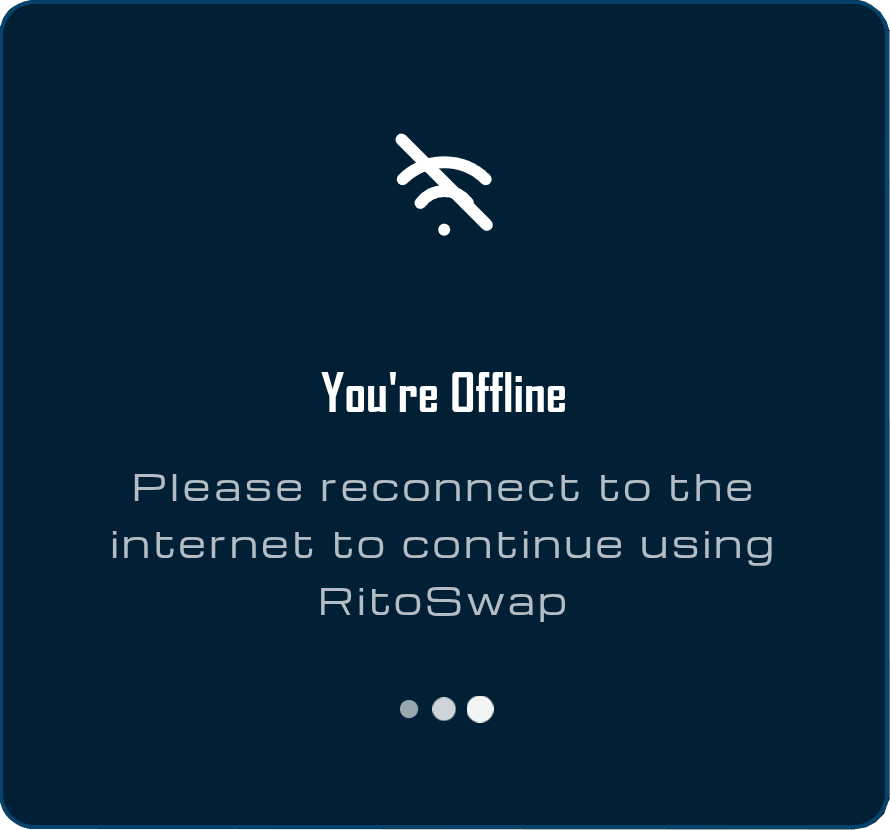
The design incorporates several intentional decisions. The Wi-Fi icon with diagonal strike-through provides immediate recognition across language barriers. The “You’re Offline” headline states the situation clearly without technical jargon or error codes. The explanatory text “Please reconnect to the internet to continue using RitoSwap” provides actionable guidance while reinforcing the application’s online requirement.
Animation and Feedback
The modal includes subtle animations that serve functional purposes beyond aesthetic appeal:
/* Pulsing Wi-Fi icon indicates active monitoring */
@keyframes pulse {
  0%, 100% { opacity: 0.6; }
  50% { opacity: 1; }
}

/* Animated loading dots show ongoing connection attempts */
@keyframes loading {
  0%, 60%, 100% {
    transform: scale(1);
    background: rgba(255, 255, 255, 0.6);
  }
  30% {
    transform: scale(1.5);
    background: rgba(255, 255, 255, 0.95);
  }
}
These animations communicate that the application remains active and monitoring for connection restoration. The pulsing Wi-Fi icon prevents users from perceiving the modal as a frozen error state, while the sequential dot animation reinforces the sense of ongoing activity.
Backdrop Treatment
The modal’s backdrop implementation balances visibility with context preservation:
.modalOverlay {
  background: rgba(0, 0, 0, 0.5);
  backdrop-filter: blur(10px);
  z-index: 10000;
}
The blur effect maintains visual connection to the underlying application while clearly indicating its unavailability. This approach prevents user disorientation that might occur with a completely opaque overlay, while the high z-index ensures the modal remains visible above all other interface elements, including other modals or dropdowns.
Integration with Application State
The offline detection system integrates seamlessly with RitoSwap’s broader state management architecture, ensuring consistent behavior across all components.
Automatic UI Blocking
When offline state is detected, the modal automatically prevents all user interactions through its full-screen overlay. This approach eliminates the need for individual components to check connection state before attempting blockchain operations.
State Preservation
The application maintains its current state during offline periods, allowing users to resume exactly where they left off once connectivity returns. NFT ownership data, wallet connections, and UI state all persist through offline episodes, creating a seamless recovery experience.
Instant Recovery
The modal is removed as soon as offline state clears because it renders only when isOffline is true:
export default function OfflineModal({ isOffline }: OfflineModalProps) {
  if (!isOffline) return null
  // ...render modal
}
This instant recovery avoids any delay that might make users question whether their connection has truly been restored.
Mobile Considerations
The offline detection system accounts for the unique challenges of mobile connectivity. Mobile devices frequently switch between Wi-Fi and cellular networks, enter buildings with poor reception, or enable airplane mode for battery conservation. The periodic polling strategy ensures these transitions are caught even when browser events do not fire.
The modal’s touch-friendly design includes appropriately sized elements and a centered layout that remains effective on smaller screens without requiring responsive breakpoints.
Performance Optimization
Despite its monitoring approach, the offline detection system implements several optimizations to minimize performance impact.
The connection check logic remains lightweight, simply reading the navigator.onLine property rather than attempting network requests. This provides instant results without latency or resource consumption. Event listeners are properly cleaned up when the component unmounts, preventing memory leaks in single-page application contexts:
return () => {
  clearInterval(interval)
  window.removeEventListener('online', handleConnectionChange)
  window.removeEventListener('offline', handleConnectionChange)
  window.removeEventListener('focus', checkConnection)
}
Testing and Debugging
The offline detection system includes built-in debugging capabilities to assist development and troubleshooting.
Browser DevTools Testing
Developers can simulate offline conditions using Chrome DevTools:
Step 1: Open DevTools Network Panel
Access the Network panel and locate the connection throttling dropdown.
Step 2: Select Offline Mode
Choose “Offline” from the presets to trigger the offline modal.
Step 3: Verify Modal Behavior
Confirm the modal appears immediately when the offline event fires (or within 30 seconds if events are suppressed).
Step 4: Restore Connection
Return to “Online” mode and verify instant modal removal.
Debug State Access
The global offline state stored on the window object enables console debugging:
// Check current offline state
console.log(window.__isOffline)

// Monitor state changes
Object.defineProperty(window, '__isOffline', {
  set(value) {
    console.log('Offline state changed:', value)
    this._isOffline = value
  },
  get() {
    return this._isOffline
  }
})
Edge Cases and Limitations
The offline detection system handles most connectivity scenarios effectively, but certain edge cases deserve consideration.
The navigator.onLine API indicates browser-level connectivity but cannot guarantee actual internet access. Users might be connected to a Wi-Fi network without internet access, causing the API to report online status incorrectly. Attempting to verify true internet connectivity would require network requests that could impact performance and introduce latency.
Some browser extensions or privacy tools might interfere with online/offline events, potentially causing detection delays. The 30-second polling interval serves as a backup for these scenarios.
Corporate networks with aggressive proxies or firewalls might cause intermittent connectivity that triggers frequent modal appearances. In these environments, users might need to rely on more stable connections for optimal experience.
Summary
RitoSwap’s offline detection system exemplifies thoughtful design for the unique constraints of blockchain applications. By implementing aggressive monitoring, clear visual communication, and seamless recovery, the system transforms a technical limitation into a coherent user experience. The modal’s design carefully balances urgency with calm guidance, ensuring users understand the situation without feeling alarmed.
Because the guard is part of the app shell, it remains consistent across browser tabs, installed PWA sessions, and development environments. The implementation demonstrates that fundamental constraints like blockchain’s online requirements can be addressed through careful UX design and robust technical architecture, creating an experience that feels polished and reliable regardless of network conditions.